
A dead pixel line (also called a dead line of pixels) is more serious than a single dead pixel. When an entire row or column fails at once, you see a dark strip across the screen — different from isolated pinpricks.
Dead Pixel Line: Causes and Fixes
How a Dead Line Differs From a Dead Pixel
A single dead pixel is one black dot on your screen — annoying but easy to ignore. A dead line of pixels is a continuous line of black pixels running horizontally or vertically across the entire display. The difference is not just visual severity — it signals a fundamentally different failure mechanism.
| Single Dead Pixel | Dead Line of Pixels | |
|---|---|---|
| Appearance | One tiny black dot | Thin line of black pixels |
| Cause | Individual pixel transistor failure | Gate driver circuit failure |
| Severity | Minor, often ignorable | Major, affects display usability |
| Spread risk | Usually isolated | May indicate progressive failure |
| Fix rate | Low (software rarely works) | Zero (circuit failure only) |
| Repair cost | $80-400 (panel replacement) | $15-400 depending on cause |
Why the difference matters: A dead pixel means one pixel's electronics failed. A dead line means an entire row or column of pixels lost their control signal — because the circuit that activates that row or column has failed.
The Gate Driver Circuit Explained
To understand dead lines, you need to understand how LCD panels control pixels.
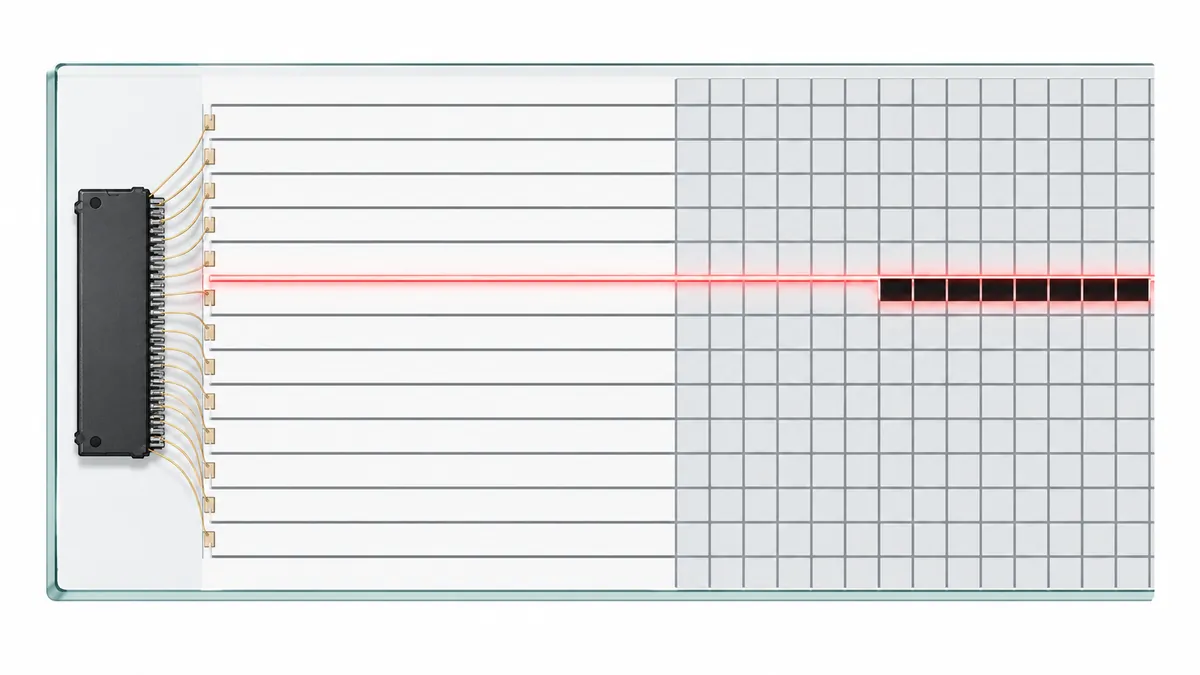
An LCD panel is organized as a grid of rows and columns. Each pixel sits at the intersection of one row electrode and one column electrode. The panel has two driver circuits:
- Gate driver: Activates each row in sequence (horizontal)
- Source driver: sends color data to each column (vertical)
When the gate driver fails for a specific row, every pixel in that row loses its activation signal. The result is a horizontal dead line — a line of black pixels running from left to right.
When the source driver fails for a specific column, every pixel in that column loses its data signal. The result is a vertical dead line — a line of black pixels running from top to bottom.
Gate-On-Array (GOA) panels: Modern panels sometimes integrate the gate driver directly into the glass substrate rather than using separate gate driver ICs. GOA panels eliminate the gate driver chips and their tab bonds — but introduce a new failure mode. If the integrated GOA circuit fails, the panel is unrepairable because you cannot swap a T-con board to fix it. GOA panels with dead lines almost always require full panel replacement.
Common Causes of Dead Lines
Gate Driver Circuit Failure
The most common cause of dead lines is gate driver failure. The gate driver is a chip mounted on the panel glass that activates each row in sequence. When one gate line fails, an entire row of pixels goes dark.
Signs of gate driver failure:
- A single horizontal line of dead pixels
- Line appeared suddenly without physical impact
- Line is perfectly straight and consistent
- Line is visible on all backgrounds and all inputs
- Device is more than 3 years old
Source Driver Failure
Source drivers send color data to columns. When a source driver fails, you get a vertical dead line.
Signs of source driver failure:
- A single vertical line of dead pixels
- Line is perfectly straight and runs top to bottom
- Line does not respond to pressure
- Multiple vertical lines appearing simultaneously
Flex Cable Damage (Laptops)
In laptops, the display connects to the main board through a flex cable that routes through the hinges. This cable carries signals for all rows and columns simultaneously.
Why flex cables fail: Every time you open or close the lid, the cable bends slightly. Over thousands of cycles, the internal conductors fatigue and eventually break. When the conductors for a specific row fail, that row becomes a dead line.
Signs of flex cable dead lines:
- Dead line appeared gradually (over weeks/months)
- Dead line position changes with lid angle
- Dead line flickers or appears/disappears with movement
- Other display issues (flickering, color problems) alongside the dead line
- Line is near the left or right edge of the screen (where the hinge cable connects)
Physical Impact
Dropping a laptop or applying significant pressure to the screen can damage the internal gate or source driver circuits — creating a dead line at the impact point.
Signs of impact-caused dead lines:
- Dead line appeared immediately after dropping the device
- Dead line is accompanied by visible physical damage (cracked glass, dented bezel)
- Dead line is at a specific location on the screen
- Other impact-related damage (stuck pixels, color distortion) appears alongside
Manufacturing Defects
Some dead lines are present from the factory and may not appear until the device has been in use for some time. Thermal cycling and electrical stress over months or years can activate latent defects.
COF/COG Bonding Failures
The connection between the driver IC and the glass substrate can desolder or corrode, severing the signal path to multiple rows or columns.
Signs of bonding failures:
- Dead line that comes and goes with temperature changes
- Dead line that responds to gentle pressure on the bezel
- Multiple dead lines appearing together in a cluster
Water Damage and Corrosion
Moisture ingress can corrode driver ICs or bonding pads, leading to dead lines that may appear months after the water exposure.
How to Test for Dead Lines
Using the screen test tool:
- Open the screen test tool
- Display pure white — dead lines appear as dark lines against white
- Display pure black — dead lines may blend into black
- Display red, green, and blue individually — dead lines are visible on all colors
- Note the orientation: horizontal = gate driver, vertical = source driver
- Watch for 60 seconds — flickering or changing lines indicate connection issues; stable lines indicate permanent failures
The pressure test: Gently press the bezel near the dead line. If the line changes with pressure, you likely have a bonding or cable issue (sometimes fixable). If the line does not respond, you have a permanent circuit failure.
The BIOS test: If a dead line appears on the BIOS screen (before your operating system loads), it is definitely a hardware issue — not a software or driver problem. The BIOS uses the most basic display driver, so any line visible there cannot be caused by operating system or software issues.
The external monitor test: Connect your computer to an external monitor or TV. If the dead line appears on the external display too, the problem is in your GPU or graphics driver — not the built-in screen.
Can Dead Lines Be Fixed?
Dead lines cannot be fixed through software. The underlying issue is circuit-level hardware failure.
What does not work:
- Pixel-fixing apps and color cycling tools
- Screen massage or pressure (except temporarily for bonding issues)
- Software updates or driver changes
- Color calibration
- Heat treatment (cold soldering iron myths)
What works:
| Fix | When It Applies | Cost |
|---|---|---|
| Flex cable replacement | Dead line is caused by cable failure (laptops) | $15-40 |
| T-con board replacement | T-con is causing row/column signal failure | $25-80 |
| Gate driver re-bonding | Tab bond has lifted; professional repair | $50-150 |
| Source driver IC replacement | Discrete source driver has failed; professional repair | $80-200 |
| Panel replacement | Any permanent dead line from panel-level failure | $80-400 |
The repair decision: Panel replacement is expensive. Before committing, compare repair cost against device value. For laptops over 3 years old, an external monitor may be more practical than screen replacement.
Real Case: MacBook Pro Dead Line From Hinge Cable
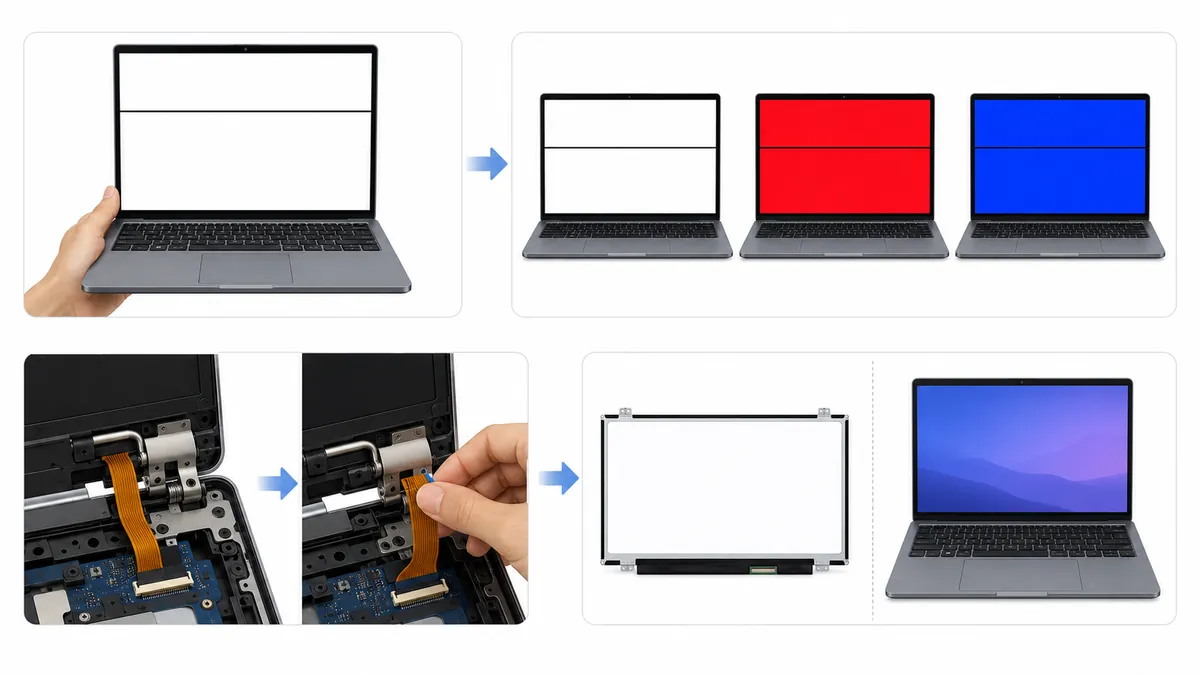
A MacBook Pro user reported a single horizontal dead line appearing after three years of ownership. The line was in the upper portion of the screen and did not flicker.
Initial assumption: Panel failure, screen needed replacement ($300-500).
Actual diagnosis: Research revealed that MacBook Pro models from this era were known for flex cable issues at the hinge. The flex cable (available for $30-50) carried signals to the panel through the hinge, and the specific conductors for that row had broken.
Resolution: Flex cable replacement ($40) completely resolved the dead line. No panel replacement needed.
Lesson: Always research your specific model before assuming panel failure. Known failure patterns for popular devices often point to cheaper fixes than panel replacement.
Real Case: Samsung Monitor With Gate Driver Failure
A Samsung monitor user reported a single horizontal dead line appearing across the middle of the screen. The monitor was 4 years old.
Initial assumption: T-con board failure.
Diagnosis steps:
- Tested with different cables and computers — line persisted.
- Opened the monitor and inspected the T-con board — clean, no visible damage.
- Inspected the gate driver ICs at the edge of the panel — found the tab bond on one gate driver had lifted from the ACF.
- Applied the tape technique (adding pressure to the tab bond area).
- The dead line disappeared temporarily but returned after the tape lost pressure.
Resolution: T-con board replacement ($35) did not help because the failure was in the gate driver, not the T-con. The final repair was panel replacement ($180).
Lesson: Not all horizontal dead lines are T-con failures. Gate driver and tab bond failures also produce dead lines, and they are often more expensive to fix because they are panel-level issues.
The Tape Technique — A Professional Trick
For dead lines caused by tab bond failure (where the driver flex cable connects to the panel glass), there is a well-known professional repair trick:
The technique: Apply strips of electrical tape along the edges of the panel where the driver flex cables enter. The tape adds pressure to the tab bond, which can restore contact between the driver IC and the panel glass.
When the tape technique works:
- The dead line responds to pressure on the bezel (squeezing the edges of the screen)
- The line position is near the top or bottom edge of the screen
- The device is more than 5 years old (ACF degradation is likely)
When it does not work:
- The line is perfectly stable regardless of pressure
- The line is in the middle of the screen (tab bonds are typically at the edges)
- The panel itself is cracked or physically damaged
This repair does not require opening the device — the tape is applied externally along the bezel seam. It is a temporary fix that can extend the device's life by months or years before proper repair or replacement.
When to Seek Repair
Seek repair if:
- Dead line is in your primary viewing area
- Dead line is growing or new lines are appearing
- Device is under warranty
- Repair cost is under 50% of device value
- The line is caused by flex cable (cheap fix)
Accept and monitor if:
- Dead line is at the edge of the screen and minimally intrusive
- Device is old and repair cost approaches replacement value
- Other major components are also failing
- The line is perfectly stable and unresponsive (likely panel-level)
Prevention
- Handle laptops carefully — avoid drops and impacts
- Open and close lids gently, without twisting
- Use protective cases for tablets and laptops
- Avoid placing heavy objects on closed laptops
- Keep devices away from extreme temperatures
- Ensure adequate ventilation for monitors and TVs
- Use surge protectors to prevent power spike damage to internal circuits
Related Issues
- What Is a Dead Pixel: Individual dead pixels
- Blue spots on screen: Localised blue specks, not a full dead line
- LCD Bright Spots: Bright glowing areas from backlight issues
- LCD Spot Damage: Physical damage to LCD displays
- Screen Test Tool: Detect and document display defects
- Black Line on Screen: Thin black lines — related defect
Conclusion
A dead line of pixels is a circuit-level failure — not a pixel-level defect. Gate driver failure, flex cable damage, and physical impact are the common causes. Software fixes are completely ineffective. Flex cable or T-con replacement resolves many dead lines at low cost before assuming panel replacement is needed. Research your specific device model for known failure patterns. Use the screen test tool to accurately document the dead line's position, orientation, and behavior before seeking repair.