
Manchas brancas em telas LCD são um defeito comum de display que pode afetar notebooks, monitores, tablets e outros dispositivos. Este guia explica o que causa manchas brancas em telas LCD, como diagnosticar o tipo específico e quais passos tomar em seguida.
Mancha Branca em LCD: Causas, Diagnóstico e Como Testar
O Que É uma Mancha Branca em uma Tela LCD
Uma mancha branca em uma tela LCD é uma área do display que emite mais luz que os pixels ao redor, criando uma mancha brilhante visível. Diferente de um pixel morto, que não produz nenhuma luz e aparece como um ponto preto, um defeito de mancha branca em LCD brilha em qualquer fundo. O efeito é mais perceptível em telas escuras ou de cor uniforme.
Manchas brancas em displays LCD variam de pontinhos minúsculos a trechos nublados grandes que cobrem porções significativas da tela. Podem aparecer repentinamente após impacto físico ou se desenvolver gradualmente com o tempo devido ao envelhecimento dos componentes.
Mancha Branca em LCD vs Outros Problemas de Tela
Nem toda mancha na tela é um defeito de mancha branca em LCD. Veja como diferenciar:
| Aparência | Provável Problema | Mais Detalhes |
|---|---|---|
| Pequeno ponto brilhante, nunca muda de cor | Pixel Travado | Guia de Pixel Morto |
| Trecho grande brilhante, pior em brilho alto | Luz de Fundo / Mancha Brilhante LCD | Manchas Brilhantes em LCD |
| Área permanentemente escura | Pixel Morto | Guia de Pixel Morto |
| Trecho branco por pressão física | Dano de Mancha LCD | Dano de Mancha LCD |
| Trecho branco nublado no celular | Dano de Pressão em Celular | Manchas Brancas em Celulares |
O Que Causa uma Mancha Branca em uma Tela LCD
Dano de Pressão
Pressão física é a principal causa de defeito de mancha branca em LCD. Pressionar um painel LCD — ao fechar um notebook com um objeto sobre o teclado, derrubar o dispositivo ou se apoiar na tela — pode danificar permanentemente a camada de cristais líquidos ou o difusor da luz de fundo. A área afetada perde a capacidade de bloquear a luz corretamente, resultando em uma mancha brilhante persistente.
Manchas brancas causadas por dano de pressão são sempre permanentes e não se recuperam sozinhas.
Vazamento de Luz de Fundo
Telas LCD usam um painel de luz de fundo para iluminar os pixels por trás. Quando a luz de fundo desenvolve saída desigual — por LEDs envelhecidos, refletores soltos ou chapas difusoras degradadas — a luz pode se concentrar em uma área, criando uma mancha branca no LCD mais visível em fundos escuros.
O vazamento de luz de fundo é uma causa comum de problemas de mancha branca em tela LCD em monitores e notebooks envelhecidos.
Pixels Travados
Um pequeno defeito de mancha branca em LCD que aparece como um ponto preciso de um único pixel geralmente é um pixel travado em vez de dano de luz de fundo. Pixels travados são pixels individuais que estão permanentemente travados em "ligado", emitindo luz branca completa. Diferente dos pixels mortos (que estão desligados), pixels travados produzem um ponto brilhante que permanece fixo em uma localização.
Alguns pixels travados podem ser revividos com aplicativos de correção de pixel que ciclam cores rapidamente para aplicar sinais elétricos aos subpixels travados.
Defeitos de Fabricação
Manchas brancas em telas LCD também podem resultar de defeitos de fábrica: partículas presas entre as camadas do display, aplicação irregular de adesivo ou descolamento microscópico. Esses defeitos podem se tornar visíveis apenas após meses de uso, quando a luz de fundo atinge brilho total ou quando os componentes começam a envelhecer.
Problemas de Mancha Branca em LCD São Permanentes
Na grande maioria dos casos, sim. Uma mancha branca em um LCD causada por dano de pressão ou vazamento de luz de fundo é um defeito físico de hardware e não desaparece sem intervenção. As únicas exceções:
- Pixels travados: alguns podem se recuperar com software de correção de pixel ou simplesmente deixando o dispositivo desligado por vários dias
- Brilho temporário da luz de fundo: em casos raros, uma saída irregular da luz de fundo pode se estabilizar após um ciclo completo de energia
Para defeitos persistentes de mancha branca em LCD, a única correção confiável é reparo profissional ou substituição da tela.
Como Testar Manchas Brancas em uma Tela LCD
Etapa 1: Use a Ferramenta de Teste de Tela
Abra a ferramenta de teste de tela e exiba cores sólidas em tela cheia. Comece com um fundo branco — o defeito de mancha branca em LCD aparecerá como uma área brilhante contrastante contra o campo uniforme. Em seguida, alterne para fundos preto, vermelho, verde e azul. Anote quais cores tornam a mancha mais e menos visível.
Etapa 2: Varie o Brilho da Tela
Aumente o brilho da tela ao máximo. Uma mancha branca em LCD causada por vazamento de luz de fundo ficará mais proeminente em níveis mais altos de brilho. Diminua o brilho para ver se a mancha desaparece — problemas de luz de fundo geralmente acompanham de perto o brilho, enquanto dano de pressão permanece relativamente constante.
Etapa 3: Identifique o Tipo
Use suas observações do teste de tela para identificar o tipo de problema de mancha branca em LCD:
- Ponto pequeno, sempre branco brilhante: provavelmente um pixel travado
- Trecho grande e brilhante, pior em brilho alto: provavelmente vazamento de luz de fundo
- Trecho que apareceu após impacto físico: provavelmente dano de pressão
- Trecho nublado na tela do celular: provavelmente manchas brancas em celular
Etapa 4: Documente o Problema
Tire uma foto da tela mostrando o defeito de mancha branca em LCD a partir do teste de tela. Documente a localização, o tamanho e as condições em que é mais visível. Esse registro é útil para pedidos de garantia, orçamentos de reparo e acompanhamento se o problema piorar com o tempo.
Quando Reparar ou Substituir a Tela do Seu LCD
Considere reparo profissional ou substituição da tela quando:
- O defeito de mancha branca em LCD está em sua área principal de visualização e interfere no uso diário
- A mancha é grande ou está crescendo com o tempo
- Seu dispositivo ainda está na garantia do fabricante — muitos cobrem defeitos de LCD
- O custo do reparo é razoável em relação ao valor do dispositivo
Para notebooks e monitores, painéis de reposição estão disponíveis para a maioria dos modelos do fabricante original ou de fornecedores terceirizados confiáveis.
Como Prevenir Problemas de Mancha Branca em LCD
- Nunca feche o notebook com objetos sobre o teclado
- Manuseie os dispositivos com cuidado para evitar impactos e quedas
- Evite pressionar com força as superfícies da tela ao limpar
- Use capas protetoras para tablets e celulares
- Teste novos dispositivos dentro do prazo de devolução para identificar defeitos de fábrica
Problemas de Tela Relacionados
Defeitos de mancha branca em LCD fazem parte de uma categoria mais ampla de problemas de display. Veja problemas relacionados que vale a pena explorar:
- Manchas Brilhantes em LCD — saiba mais sobre trechos brilhantes causados por falhas da luz de fundo
- Dano de Mancha LCD — dano físico ao painel do display e suas camadas
- Pixel Morto — pixels permanentemente escuros e pixels travados
- Mancha Preta — áreas permanentemente escuras na tela
- Manchas Brancas na Tela — guia geral sobre manchas brancas em todos os tipos de dispositivos
- Manchas Brancas em Celulares — manchas brancas em telas de celular e tablet
- Ferramenta de Teste de Tela — diagnostique os problemas da sua tela em casa
Veja também: Manchas Azuis na Tela — manchas com tom azulado no display causadas por falha do transistor do subpixel, um defeito comum em telas LCD e OLED.
Veja também: Linha Verde na Tela — linhas verdes persistentes na tela, um defeito de display relacionado causado por falhas de hardware semelhantes.
- Tela Laranja no Notebook: tom laranja persistente no display — problema de cabo, calibração ou hardware

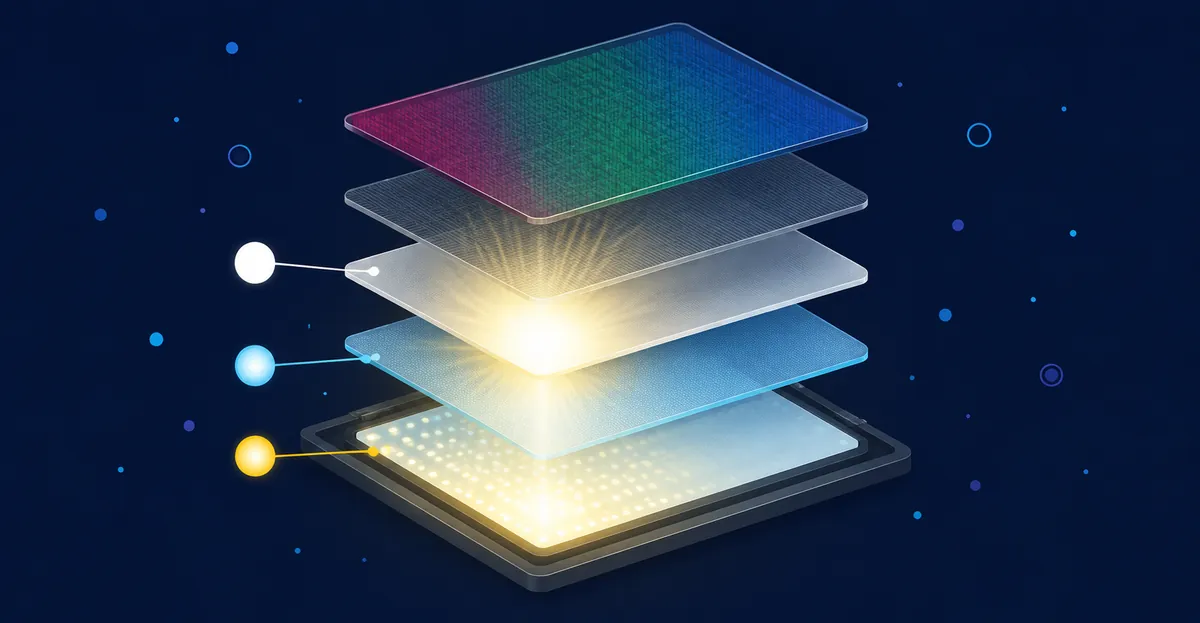
Como as Camadas do LCD Produzem Manchas Brancas
Entender a estrutura em camadas do LCD ajuda a explicar por que as manchas brancas aparecem e por que a maioria não pode ser corrigida sem substituir o painel. Comunidades de reparo como iFixit e Reddit frequentemente explicam a construção do LCD como uma pilha de camadas distintas, cada uma das quais pode falhar de uma maneira que produz uma mancha branca.
Um painel LCD típico contém as seguintes camadas, de trás para frente:
- Unidade de luz de fundo (BLU): uma ou mais tiras de LED que produzem luz branca. O escurecimento ou saída irregular dos LEDs com o tempo cria áreas brilhantes localizadas.
- Placa guia de luz (LGP): uma chapa transparente de acrílico ou policarbonato que distribui a luz dos LEDs uniformemente pelo painel. Arranhões, rachaduras ou deformações por pressão criam manchas brilhantes visíveis.
- Películas difusoras: duas ou três chapas empilhadas sobre a LGP que dispersam a luz para eliminar pontos quentes. Marcas de compressão nessas películas aparecem como áreas brancas suaves e difusas.
- Polarizadores: películas ópticas que controlam a direção da luz que passa pela camada de cristais líquidos. Danos a um polarizador criam manchas brilhantes visíveis ou desvios de cor.
- Camada de cristais líquidos: a camada ativa onde a tensão aplicada a cada pixel controla a quantidade de luz que passa. Pixels travados nesta camada aparecem como pontos precisos e nítidos.
- Filtro de cor e matriz TFT: a camada frontal onde cada subpixel recebe sua cor vermelha, verde ou azul.
O dano de pressão tipicamente afeta as películas difusoras e a LGP, produzindo uma mancha branca de bordas suaves. O vazamento de luz de fundo normalmente afeta a interface BLU/LGP, produzindo uma área brilhante mais visível em fundos escuros. Os pixels travados afetam a camada de cristais líquidos, produzindo um ponto nítido de um único pixel. Defeitos de fabricação podem afetar qualquer camada, mas mais comumente aparecem como descolamento entre camadas.
Estudo de Caso Real: Vazamento de Luz de Fundo em Monitor Dell U2719DX
Um relato comum em comunidades de reparo como iFixit e Reddit envolve um proprietário de Dell U2719DX que notou uma mancha brilhante no canto inferior direito da tela cerca de 18 meses após a compra. A mancha era mais visível em fundos escuros com brilho alto, e quase invisível em conteúdo claro. Executar a ferramenta de teste de tela em um fundo preto revelou que a mancha tinha bordas suaves e irregulares, consistentes com vazamento de luz de fundo em vez de dano de pressão.
O proprietário contatou o Suporte Dell, que confirmou o problema por diagnóstico remoto e providenciou uma substituição adiantada. A unidade de reposição chegou em cinco dias úteis, e o proprietário devolveu a original com uma etiqueta de envio pré-paga. Como o monitor ainda estava coberto pela garantia de serviço de troca avançada de três anos da Dell que acompanha a linha UltraSharp, todo o processo foi gratuito. O caso ilustra que linhas premium de monitores geralmente têm cobertura de garantia mais longa e abrangente que displays de consumo.
Estudo de Caso Real: Dano de Pressão por Fechamento da Tampa do Notebook
Outro cenário frequentemente relatado em comunidades de reparo envolve um proprietário de notebook que fechou a tampa enquanto um receptor USB, estojo de fones ou pequeno objeto estava sobre o teclado. Dias depois, uma mancha branca brilhante apareceu na área da tela diretamente acima de onde o objeto havia estado. A mancha era visível em qualquer cor de fundo — confirmando dano de pressão em vez de vazamento de luz de fundo.
A maioria desses casos não é coberta pela garantia padrão porque os fabricantes os tratam como dano acidental. Os custos de substituição do painel fora da garantia variam por modelo: notebooks empresariais de consumo geralmente ficam em $80-150 em peças, ultrabooks $150-300, e modelos premium como MacBook Pro e Dell XPS podem exceder $400 quando atendidos pelo fabricante. Oficinas de reparo de terceiros geralmente cobram menos, mas com qualidade variável dos painéis de reposição.
Lista de Verificação de Prevenção Contra Manchas Brancas em LCD
A maioria dos problemas de mancha branca em LCD é causada por dano de pressão ou ambiental. Uma rotina de prevenção consistente reduz drasticamente o risco:
- Nunca feche um notebook com qualquer coisa sobre o teclado. Isso inclui canetas, receptores USB, fones de ouvido, clipes de papel e pequenos cabos. Mesmo um objeto leve pode comprimir as películas difusoras.
- Use uma capa acolchoada ao transportar notebooks em bolsas. O contato direto com outros itens (carregadores, livros, garrafas de água) pode transferir pressão para a tela durante um solavanco.
- Evite segurar notebooks pela borda da tela. Carregue notebooks pela base ou pela alça de uma bolsa dedicada.
- Use um pano de microfibra ao limpar. Toalhas de papel, lenços e fibras de roupas podem deixar arranhões em polarizadores que aparecem como marcas brancas suaves.
- Mantenha os LCDs longe da luz solar direta e fontes de calor. A exposição prolongada ao calor acelera a degradação do adesivo e aumenta o risco de descolamento.
- Evite colocar monitores LCD virados para baixo em superfícies duras. Mesmo um breve contato com a face para baixo durante a instalação pode transferir pressão para a camada de luz de fundo.
- Monte monitores em suportes ou braços estáveis. Um monitor que balança tem mais chance de ser atingido por contato acidental.
- Teste telas novas dentro do prazo de devolução. Use a ferramenta de teste de tela imediatamente após o recebimento para confirmar que não há defeitos de fábrica.
Como os Fabricantes Definem Limites de Defeitos Aceitáveis
Os painéis LCD são classificados contra padrões de contagem de defeitos antes de saírem da fábrica. O framework mais amplamente citado é a ISO 13406-2, um padrão ergonômico para telas planas que define quatro "Classes de Falha de Pixel" com base no número máximo de pixels defeituosos permitidos por milhão de pixels, conforme documentado pela referência ISO 13406-2 na Wikipedia. O padrão reconhece três tipos de defeitos: Tipo 1 pixels quentes (sempre ligados, brancos), Tipo 2 pixels mortos (sempre desligados, pretos) e Tipo 3 subpixels travados.
Classe I a Classe IV
Sob a ISO 13406-2, os painéis Classe I permitem zero defeitos de qualquer tipo por milhão de pixels. Painéis Classe I são tipicamente reservados para equipamentos de imagem médica e monitores profissionais de ponta. A Classe II é a classe de painel de consumo mais comum e permite até 2 defeitos Tipo 1, 2 defeitos Tipo 2 e 5 defeitos Tipo 3 por milhão de pixels, sem clusters de falhas mistas Tipo 1/Tipo 2. A Classe III permite 5 falhas Tipo 1, 15 Tipo 2 e 50 Tipo 3 por milhão de pixels. A Classe IV permite 50 falhas Tipo 1, 150 Tipo 2 e 500 Tipo 3 por milhão de pixels. A partir de 2007, a maioria dos fabricantes de LCD de consumo especificava seus painéis como Classe II, e essa prática continua amplamente hoje segundo o guia de política de defeitos de pixel da KTC.
Como as Garantias dos Fabricantes Aplicam o Padrão
Os principais fabricantes usam a ISO 13406-2 (ou sua classificação equivalente própria) para definir limites de substituição para pedidos de garantia. HP, Dell, Lenovo e Apple publicam todas políticas de tolerância zero ou tolerância limitada: tipicamente 1 a 5 pixels brilhantes ou escuros na área central de visualização antes de acionar a substituição, com requisitos mais rigorosos para linhas de produtos premium como Dell UltraSharp e Apple Pro Display XDR. Os fabricantes não publicam taxas de falha exatas, mas comunidades de reparo como iFixit e Reddit frequentemente relatam que o dano por pressão é consistentemente o motivo mais citado de rejeição de garantia, mesmo quando o defeito está dentro do orçamento nominal de defeitos do painel. Uma mancha branca localizada na área central de visualização tem maior probabilidade de ser honrada do que um defeito idêntico na borda da tela, refletindo o princípio de proteção ao consumidor de que defeitos que "interferem no uso" pesam mais que contagens numéricas de pixels.
Quando o Padrão Trabalha Contra Você
O framework ISO 13406-2 considera anomalias individuais de pixel, não grandes trechos brilhantes por dano de luz de fundo ou pressão. Um defeito de mancha branca em LCD que cobre um trecho de um centímetro normalmente contém centenas de anomalias de subpixels, excedendo em muito até o limite da Classe IV, o que significa que o defeito está inequivocamente fora da especificação declarada pelo fabricante. A documentação da ferramenta de teste de tela (mostrando o trecho em fundos branco, preto, vermelho, verde e azul) torna mais difícil para um fornecedor argumentar que o problema se enquadra na tolerância da Classe II. Sempre execute a ferramenta de teste de tela e salve a foto antes de contatar o suporte.
Faixas de Custo de Reparo por Tipo de Dispositivo
Os custos de reparo para um defeito de mancha branca em LCD variam significativamente por classe de dispositivo, tipo de painel e mercado de trabalho. Os números abaixo vêm de relatórios agregados da comunidade e preços de serviço autorizado publicados pelos fabricantes; sempre solicite um orçamento por escrito do seu fornecedor ou centro de reparo certificado antes de autorizar o trabalho.
Notebooks Convencionais e Notebooks Empresariais
Notebooks de classe de consumo e empresarial da Dell, HP, Lenovo, Acer e ASUS tipicamente suportam substituição de painel LCD na faixa de $80-150 em peças segundo a discussão de custos fora da garantia em comunidades de reparo, com mão de obra adicionando $50-100 em oficinas de reparo independentes. Centros de serviço autorizados cobram mais — geralmente $180-300 no total — mas a qualidade do painel é especificação OEM. Modelos comuns nesta faixa incluem Dell Latitude, HP EliteBook, Lenovo ThinkPad série T e linhas convencionais Acer Aspire.
Ultrabooks e Notebooks Windows Premium
Modelos finos e leves premium como Dell XPS, HP Spectre, Lenovo ThinkPad X1 Carbon e Microsoft Surface Laptop usam painéis IPS ou OLED de alta resolução que custam mais para produzir. Peças de reposição de painel fora da garantia sozinhas geralmente custam $150-300, segundo recibos de reparo citados pela comunidade. Faturas totais de reparo através do fabricante frequentemente chegam a $350-600 uma vez incluído o trabalho. Muitos usuários nessa faixa ponderam o custo do reparo contra o valor residual do dispositivo antes de autorizar o trabalho.
MacBook e Displays Apple Premium
As linhas MacBook Air e MacBook Pro da Apple usam painéis LCD de grau Retina que são colados no conjunto da tampa, aumentando o tempo e o custo da mão de obra. A substituição de painel fora da garantia geralmente fica entre $400-800 em uma Apple Store ou provedor de serviço autorizado, com o MacBook Pro de 16 polegadas na extremidade superior. A cobertura AppleCare+ da Apple reduz o custo para uma taxa de serviço de $99 para dano acidental sujeito aos termos da apólice; sem cobertura, o custo é frequentemente alto o suficiente para que os usuários avaliem o valor de troca antes de reparar. Oficinas de terceiros às vezes oferecem substituição de painel de MacBook de menor custo, mas a qualidade dos painéis do mercado secundário varia e usar um pode afetar a calibração de cores de fábrica.
Monitores de Mesa e Displays Externos
Monitores LCD externos da Dell, LG, Samsung, ASUS e BenQ seguem uma curva diferente de economia de reparo. As linhas UltraSharp, UltraGear e ProArt tipicamente suportam substituição apenas do painel a $150-300, mas a maioria dos usuários substitui o monitor inteiro quando fora da garantia porque monitores novos equivalentes geralmente custam menos que a cotação de reparo. Monitores de consumo de entrada e médio porte na faixa de preço de $100-300 são geralmente tratados como descartáveis quando aparece uma mancha branca, já que peças de reposição mais mão de obra se aproximam do custo de uma unidade nova. Monitores premium 4K e 5K (Apple Studio Display, LG UltraFine 5K, Dell série UP) às vezes justificam o reparo porque substituições novas custam $1.500 ou mais.
Celulares e Tablets
Dispositivos móveis usam painéis OLED na maioria dos flagships modernos (iPhone 12 e posterior, Samsung Galaxy série S, Google Pixel 6 e posterior) e LCD em modelos de entrada e médio porte. A substituição de tela fora da garantia geralmente fica entre $100-200 para celulares LCD de médio porte, $200-350 para celulares OLED, e $350+ para dobráveis premium. A garantia do fabricante geralmente não cobre dano por pressão, que é a principal causa de manchas brancas em dispositivos móveis, então cobertura de dano acidental ou seguro é a principal forma de limitar esses custos. O guia de manchas brancas em celular cobre o diagnóstico específico para celulares com mais detalhes.
Conclusão
Uma mancha branca em uma tela LCD é um defeito visual causado por dano de pressão, vazamento de luz de fundo, pixels travados ou problemas de fabricação. O primeiro passo é executar a ferramenta de teste de tela para confirmar o tipo e a extensão do problema. Embora a maioria dos defeitos de mancha branca em LCD seja permanente sem reparo profissional, entender a causa ajuda você a tomar uma decisão informada sobre reparo ou substituição. Proteja seus dispositivos contra dano físico e teste telas novas dentro do período de garantia para detectar defeitos cedo. Se a mancha branca estiver em uma área de baixo impacto e não estiver piorando, você pode decidir simplesmente conviver com ela — mas se estiver se espalhando, estiver em sua área principal de visualização ou interferir em trabalho crítico de cor, reparo profissional ou substituição do painel é a única solução confiável.