An Apple iPhone Duo broken screen, in the launch-week reports Apple answered on 26 October 2026, is a hardware pattern on the inner OLED: a crack or dead-pixel stripe down the hinge crease, then bright or white lines that stay on after you open the phone. Apple told 9to5Mac and The Verge it is “aware of an issue impacting the inner display on a small number of iPhone Duo units” and that owners should contact AppleCare for a replacement.
Apple iPhone Duo Broken Screen: Inner Crack and Lines
This guide maps that defect against a normal crease, a cover-layer scratch, accidental damage billed at Apple’s inner-display fee, and the photos that do not match. You will leave with a way to document the hinge event, a cost table for inner-screen work without AppleCare+, and a first-hour checklist once bright lines appear.
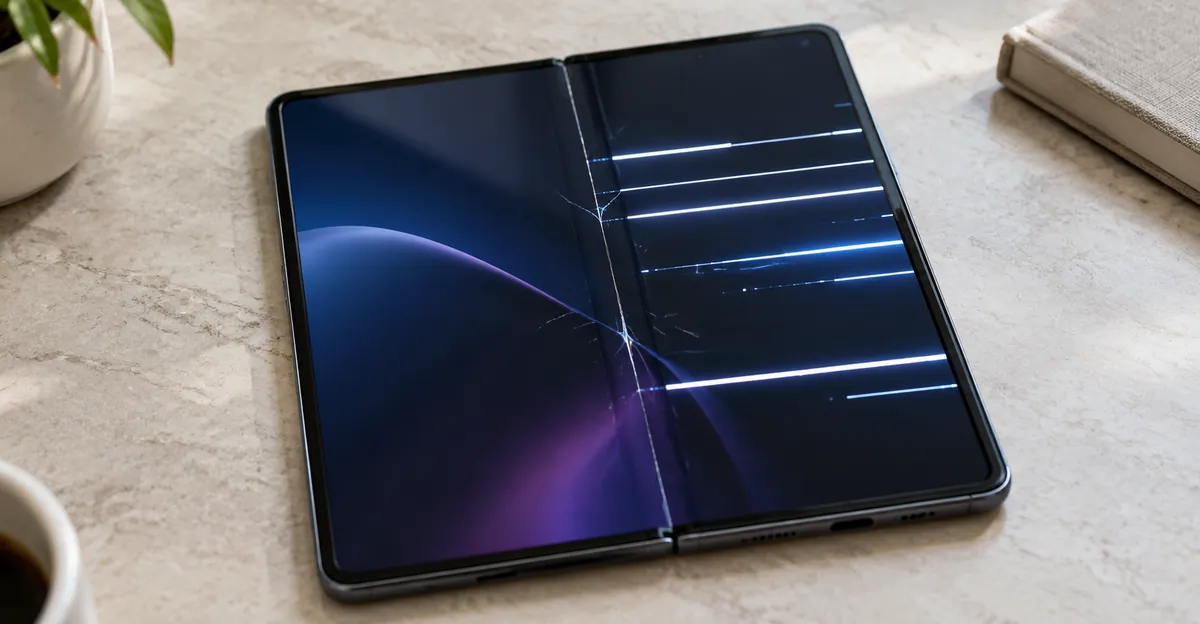
Why is my iPhone Duo inner screen cracking along the hinge?
The inner screen cracks along the hinge because that is where the flexible OLED has to form a tight curve every time the book closes. On units that fail early, the damage is not a random corner chip. Ars Technica describes several bright lines that start just below the midpoint of the inner display and run to the bottom and right edges, sometimes with a dead-pixel line following the crease down to that junction. Macworld reports the same geometry: a thin vertical line down the middle of the inner screen and a thicker line across the right half.
That shape is what OLED matrix damage looks like. When the stack is crushed, some pixels stay driven at full brightness and some get no voltage at all. Software dimming and a restart do not rewrite those rows. The only lasting repair is a new inner display assembly, which is why Apple’s public answer for this issue is a device replacement rather than a settings tweak.
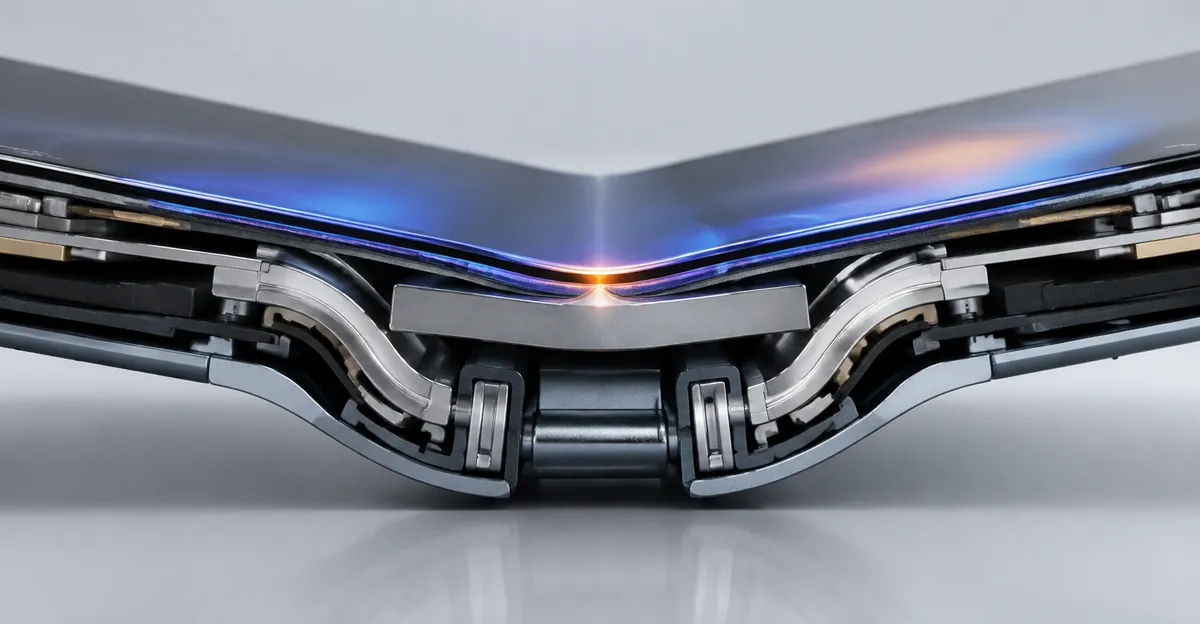
iFixit tore a Duo down, built a 3D hinge model from teardown footage, patents, and CT scans, and overlaid the reported break locations. The breaks cluster near the transition from the gap for the crossing flex cable to the central hinge support, slightly below where the display cable actually passes through. iFixit’s closing simulation shows one plausible path: a center support bar that does not drop far enough for the waterdrop bend, so the curved OLED lands on a hard edge. A second hypothesis is a curved hinge rail that fails to retract. Apple has not confirmed either part as the official cause. Treat them as mechanical suspects that explain why the same inner-screen map keeps showing up, not as a DIY diagnosis you can verify at home.
Owners describe a sequence, not a slow crease. The hinge tightens. There is a crunch, a click, or a loud pop when they push past the resistance. Then the lines are there. iFixit quotes one owner who had folded the phone about four times. Another had the failure before finishing setup. Ars Technica notes that most affected devices fail within about a day, sometimes after only a few open-close cycles. If you heard that noise and then saw the midline crack, stop cycling the hinge. Extra folds do not “seat” a stuck support; they add load to an OLED that is already damaged.
Separate that event from three look-alikes before you argue with support.
| What you see | Likely cause | Next step |
|---|---|---|
| Soft shadow along the fold, pixels still light evenly | Normal crease / nano-texture blending | Keep using; this is not the defect |
| Surface scratch that moves with a wipe, no bright pixel rows | Cover-layer mark or debris | Clean per Apple; do not peel the factory cover |
| Crunch from grit in the hinge, no matching bright-line map | Particle in the mechanism | Stop, inspect the hinge, contact Apple if it binds |
| Midline crack plus bright or white lines after a click | Inner OLED matrix damage | Photograph, stop folding, contact AppleCare |
| Viral photo that does not match your panel geometry | Unverified or AI image | Use your own photos, not the post |
Apple’s own handling page already treats the hinge as a contamination risk: keep sand and grit away, and check that the hinge is clean before you open the Duo. iFixit’s fluorescent-powder test made a hinge crunch after particles reached the moving parts, even though most powder stopped at adhesive barriers. A grit crunch and the launch defect can feel similar in the hand. The defect reports, though, share the same inner-OLED map after very few folds, including on units that never left a desk. If the inner panel already shows the bright-line pattern, cleaning the hinge will not restore the pixels.
The outer cover screen is a different assembly. A Duo with a broken inner display can still show a picture on the cover. That does not mean the inner panel is a software overlay. Take a screenshot while the inner lines are visible and open the file on another device. If the lines are missing from the file, they are in the physical OLED, the same rule we use for horizontal white lines on a phone and for an iPhone bright spot.
Does Apple replace an iPhone Duo with a broken or cracked display for free?
Apple’s 26 October 2026 statement tells owners to contact AppleCare for a replacement. That is a support path, not a published “free for every cracked Duo” coupon. The company said it is aware of an issue on a small number of units. The Verge reported that Apple’s Alex Kirschner said most units are not susceptible and that the issue appears quickly on units that have the defect. 9to5Mac added two operational facts: you do not need AppleCare+ for this inner-display problem, and if you bought the phone from a carrier you should contact AppleCare directly rather than the carrier.
“Free” in practice means Apple treats the unit as a hardware defect and swaps it under the Limited Warranty or consumer law, with no inner-display service fee. That is the outcome owners want, and it is the outcome Apple’s statement points toward for the acknowledged issue. It is not the same as Apple listing a zero-dollar inner-display repair on the public iPhone screen service page. That page still says Apple inspects the product, that accidental damage is outside the Limited Warranty, and that ineligible devices can be billed at full replacement value.
The distinction is the classification at the counter, not the photo you saw online. Matching the known inner-screen map after a hinge click, with no drop, no keys folded inside, and no peeled cover layer, is the story that fits Apple’s statement. A smashed cover, a bent enclosure, liquid, or a crack that started at a corner after a fall is a different claim. Apple’s handling guide is explicit that folding hard objects such as keys or coins inside the Duo can damage the inner display, and that you should not try to remove the nano-texture cover layer. Those events look like screen damage too. They are the events that get priced as inner-display or other accidental damage.
Store swaps have already happened. The Verge cited an Australian owner who received an on-the-spot replacement. The BBC described a New York store swap. AppleInsider spoke with staff at 20 Genius Bars and counted four inner-screen cases, each replaced from service stock rather than sales stock. Macworld reported numerous store swaps while noting that Apple has not issued an official repair program. Those anecdotes show that replacement is available. They do not prove every store has a Duo on the shelf today. Ars Technica warned that spares may be short. If a store cannot swap immediately, AppleCare can still open a mail-in or later in-person case. Ask for the case number before you leave.
Do not buy AppleCare+ after the lines appear in the hope that a new plan will reclassify damage that already exists. 9to5Mac’s report is that this defect does not require AppleCare+ at all. Buying a plan late does not improve a Limited Warranty hardware claim, and it does not turn accidental damage into a manufacturing defect.
If support starts quoting inner-display repair instead of a unit swap, stay on the defect pattern: early failure, hinge click or crunch, midline inner crack, bright lines across the inner OLED, no drop. Ask them to apply Apple’s 26 October statement. You are requesting the replacement Apple already told the press to offer, not a courtesy discount on a $999 part.
How much does iPhone Duo inner screen replacement cost without AppleCare+?
Without AppleCare+, the number that matters is Apple’s listed inner-display fee, not the cover-glass fee and not a generic “iPhone screen” quote from an older model. iFixit published Apple’s in-house Duo service prices after launch. Inner display damage is $999 at full price and $99 with AppleCare. Cover-layer damage is $49 full / $19 with AppleCare. Outer display damage is $379 / $29. Other damage is $1,499 / $99. Battery service is $229 full and $0 with AppleCare.
Those inner-display figures are the accidental-damage and out-of-warranty menu, not the price of the launch defect if Apple agrees it is the acknowledged inner-display issue. For that issue, Apple’s instruction is a replacement through AppleCare, and 9to5Mac reported that AppleCare+ is not required. The $999 line is what you pay if the visit is classified as inner-display damage rather than a hardware defect swap.
| Service (Apple list, USD) | Without AppleCare+ | With AppleCare |
|---|---|---|
| Cover layer | $49 | $19 |
| Outer display | $379 | $29 |
| Inner display | $999 | $99 |
| Other damage | $1,499 | $99 |
| Launch inner-OLED defect matching Apple’s statement | Replacement via AppleCare; AppleCare+ not required | Same support route; still photograph first |
Bring the right photos so the $999 line is not the default. Photograph the inner screen on a solid white or black field so the bright lines are obvious. Photograph the midline crack in landscape so the hinge is in frame. Photograph the exterior: no dented book edge, no crushed corner, no liquid mark. Photograph Settings > General > About so the serial is in the same roll as the defect. If the hinge clicked, write the time and how many folds you had completed. If you never dropped it, say so once, calmly, and let the photos do the rest.
Do not peel the factory nano-texture cover to “prove” the glass is intact. Apple’s handling page says that cover is an integral part of the inner display, that you should not attempt to remove it, and that an add-on protector can compromise the calibrated panel. Cover-layer service is the $49 line. Peeling it yourself can turn a defect claim into damage Apple did not cause. The same warning applies to heat, crease massage, and hinge oil. Those moves belong in the accidental-damage bucket.
Third-party quotes will exist, but they will not match Apple’s $999 because the inner assembly includes the flexible OLED, the cover layer, and hinge-adjacent supports. Apple’s self-service repair manual lists Inner Display and Inner Display Assembly as separate procedures and includes a heated display-removal fixture. That is a shop process. Paying an unauthorized shop to attempt it, then bringing a misaligned book to Apple, is how a defect case becomes “other damage.”
If Apple agrees the unit matches the acknowledged issue, you should not be shopping for a $999 inner-display repair at all. You should be in the replacement queue. If Apple disagrees, ask what observation moved the case into inner-display damage, and whether a second inspection at another store or a senior advisor is available. Keep the first case number. A written estimate that says “inner display damage — $999” is useful if you later show that the panel failed in the known pattern with no impact.
Compare that fee with device value only after classification. Ars Technica put the US launch around $2,000. The BBC put the UK start at £1,999. A $999 inner-display bill is roughly half a US Duo. A warranty swap is not. The cost question is therefore two questions: does this unit match Apple’s inner-display issue, and if not, which line on Apple’s menu applies.
Is an iPhone Duo cracked screen covered under warranty or AppleCare+?
Coverage depends on what cracked, and on whether Apple treats it as a manufacturing issue or as accidental damage. The Apple Limited Warranty, as restated on Apple’s iPhone screen repair page, covers manufacturing issues for one year from purchase. It does not cover accidental damage. AppleCare+ (and related AppleCare plans) adds accidental-damage service at a fee. Consumer law in your country sits on top of both.
For the launch inner-OLED pattern, Apple’s press statement plus 9to5Mac’s follow-up is the working rule: contact AppleCare for a replacement, and you do not need AppleCare+ for this issue. That is Limited Warranty / consumer-law territory for a hardware defect, not an AppleCare+ incident. You still need the phone to be within the warranty window or a local equivalent, and you still need the damage to match the defect rather than a drop.
| Situation | Limited Warranty | AppleCare+ | What to request |
|---|---|---|---|
| Inner midline crack and bright lines after a hinge click, early in use, no drop | Yes, as the acknowledged inner-display issue | Not required | Unit replacement via AppleCare |
| Same pattern, out of the one-year window, no AppleCare+ | Unlikely unless consumer law applies | N/A | Ask AppleCare anyway; then expect inner-display pricing if declined |
| Keys or coins folded inside, cover peeled, or impact on the book | No (accidental) | Yes, at the inner-display or other-damage fee | AppleCare+ service, not a defect swap |
| Normal crease only | Not a defect | Not a repair | Keep using |
| Cover-layer scratch only | Unlikely | Cover-layer fee | Do not peel; ask for cover-layer pricing if you want it replaced |
AppleCare+ still has a job on a Duo even when this defect does not need it. The inner display is a $999 accidental-damage line. The cover layer is cheap. The outer display is $379. “Other damage” is $1,499. iFixit’s comparison table put Duo inner-display work well above Pixel 11 Pro Fold and Galaxy Z Fold 8 official inner-screen prices. If you already own AppleCare+, keep the plan for drops and for a future inner-display accident. If you do not own it, do not delay the defect claim in order to shop for a plan.
Document the claim as warranty, not as “I cracked my screen.” Say the inner display failed along the hinge with bright lines after a click, that you did not drop the phone, and that you are following Apple’s 26 October instruction to contact AppleCare for a replacement. Attach the photo set from the cost section. If an advisor labels it accidental, ask which physical sign they are using: enclosure dent, liquid indicator, peeled cover, or something else. A crease shadow is not accidental damage. A bright-line map after four folds is the pattern in the teardown overlay.
Pressure damage on a conventional phone is usually a blotch from a squeeze or a sit-on. The Duo defect is mechanical stress at a designed bend, concentrated where iFixit mapped the support transition. That difference is useful when a technician who sees many drop-cracked iPhones tries to file this as the same event. Point to the hinge midline and the right-half bright lines, not to a corner.
Carrier and bank warranties do not replace Apple’s classification. A wireless insurance claim can still ask for a deductible and a refurbished unit. For this defect, Apple told carrier buyers to start at AppleCare. Use insurance only if Apple declines and the damage is truly accidental.
What should I do if my iPhone Duo shows bright lines after opening the hinge?
Stop opening and closing the book. The bright lines are already an OLED matrix failure. Another fold is another load cycle on a panel that has split electrically. Owners in the iFixit and Ars Technica reports heard resistance, then a pop or crunch, then the lines. Forcing past a tight hinge is how some of those units failed in the first place.
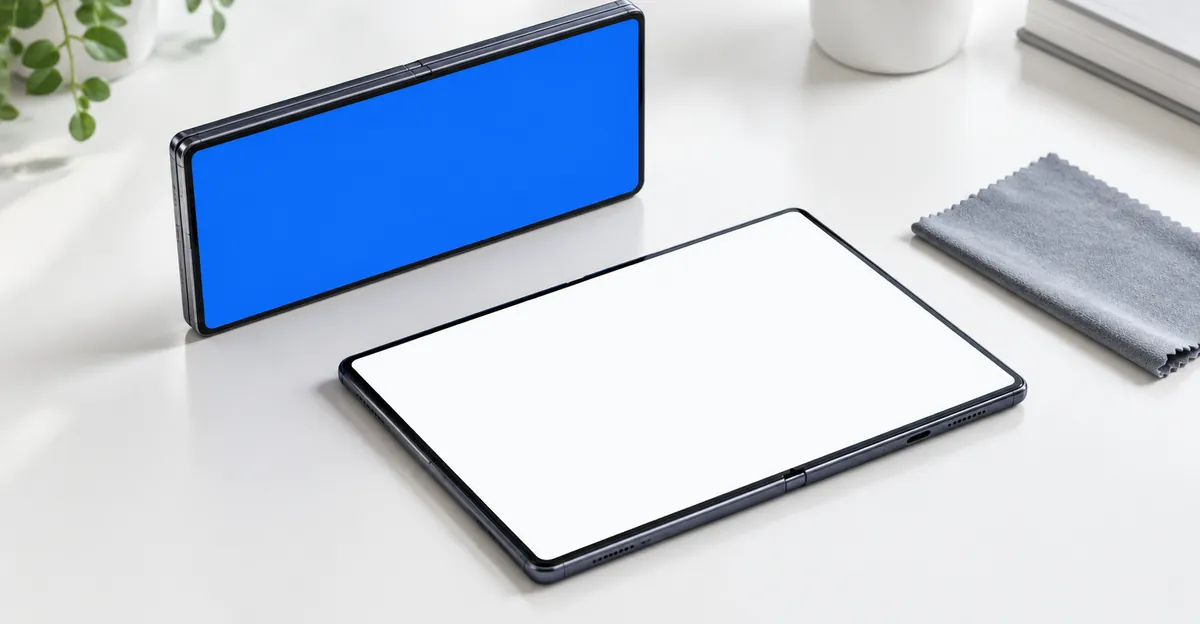
Photograph before you do anything cosmetic. Open the inner display just enough to capture the lines, or use the cover screen to trigger a screenshot workflow if the inner touch band is dead. Shoot a solid white field and a solid black field. White shows the crack and any dark dead-pixel stripe down the crease. Black makes the stuck-bright rows obvious. If the inner touch still works, open the Screen Test page in Safari and cycle those fields; an iPhone black screen test is the black-field half of that check. If inner touch is gone, photograph a pale lock screen or a Notes page. Include one shot of the closed exterior and one of Settings > General > About.
Do not clean with liquids in the hinge, do not run compressed air, and do not insert a pick. Apple’s handling page says to keep moisture out of openings, not to use compressed air, and to keep grit away from the hinge. A dry, lint-free look at the hinge gap is enough to see a pebble. If you see debris, stop. If you see nothing, stop anyway once the lines are present. Cleaning does not resurrect crushed OLED rows.
Contact AppleCare the same day. Macworld listed Apple’s customer number 800-275-2273 and AppleCare at 800-APLCARE, plus a local Apple Store. Use Apple’s screen service page or the Apple Support app to start a case if you are outside the US. Say the inner display shows bright lines after opening the hinge, that you heard a click or crunch, and that you are asking for the replacement in Apple’s 26 October statement. Carrier buyers: call Apple, not the carrier.
Service options Apple already documents:
- In person at a Genius Bar or Apple Authorized Service Provider. This is how the on-the-spot swaps in Australia and New York happened.
- Mail-in with a prepaid box, if the store has no Duo in service stock.
- Express Replacement Service, which Apple describes as a benefit of an AppleCare plan: Apple ships a replacement, holds a card authorization, and you return the original within 10 business days. See Express Replacement Service. If you do not have an AppleCare plan, do not assume ERS is the defect path. Ask AppleCare what they can offer for this case. 9to5Mac’s report is that the defect replacement does not require AppleCare+; it does not say ERS is included for every Limited Warranty swap.
While you wait, leave the Duo closed if the inner panel is the damaged one, and use the cover screen only if you must reach Apple ID, Find My, or a backup. Back up to a computer or iCloud while the device still unlocks. Sign out of nothing until Apple tells you to prepare a replacement. Do not fold objects inside. Do not apply a third-party inner screen protector over a cracked OLED to “hold it together.” Apple warns that an add-on protector can compromise the nano-texture inner display, and adhesive on a split panel is extra damage.
If the hinge is loose, will not complete its travel, or makes a new noise on a unit that still has a clean inner image, treat that as a stop as well. Macworld noted an Apple support page on Duo hinge issues covering incomplete open/close, unexpected noise, a loose hinge, a bent or broken hinge, and enclosure damage that affects hinge travel. A noisy hinge without lines is not proof you will get the bright-line failure. It is proof you should not keep exercising a mechanism that already feels wrong. Contact AppleCare before the OLED map appears. After the map appears, the photos of the inner screen are the claim.
If a store quotes $999 on the spot, pause the payment, show the photo set, and ask for a defect classification under the 26 October statement. If they still decline, take the written estimate and the case number and call AppleCare again. A second advisor can reverse a first-pass accidental-damage tag when the geometry matches the known inner-screen issue.
The honest end state for this pattern is a replacement unit or an inner-display assembly fitted by Apple. Pixel-fix videos, color cycling, and brightness tricks do not repair a crushed foldable OLED. Your job in the first hour is to stop the hinge, capture the evidence, and get into Apple’s replacement queue before someone files the visit as a $999 accident.
Apple’s instruction for an iPhone Duo broken inner screen is to contact AppleCare for a replacement. Match your panel to the hinge-line crack and bright inner rows, keep AppleCare+ out of a defect claim that does not need it, and treat $999 as the accidental inner-display price rather than the default. Photograph the inner OLED, stop folding, and start the case while the story is still “the phone failed,” not “I kept using a cracked book.”