White Spot on iPad Screen: Causes and Repair Options
A white spot on an iPad screen is a localized bright area that glows more intensely than surrounding pixels. This guide covers white spots on all iPad models, explaining the causes, diagnosis methods, and repair options.

What Is a White Spot on iPad Screen
A white spot on an iPad screen is a region of the display where pixels appear brighter than the surrounding area. Unlike dead pixels (which are permanently dark), white spots emit excess light, creating a glowing or washed-out patch. This distinction is critical: dead pixels are tiny, pin-sharp dots that stay dark, while white spots are typically larger, cloudy patches that stand out most on light backgrounds.
White spots are most visible against dark backgrounds and may be barely noticeable on bright screens. They can range from tiny pinpoints to larger patches covering significant portions of the display. The spot stays in the same physical location on the glass regardless of what content is displayed, which is the clearest indicator that the problem lives inside the display assembly rather than in the image being shown.
How iPad LCD Displays Work
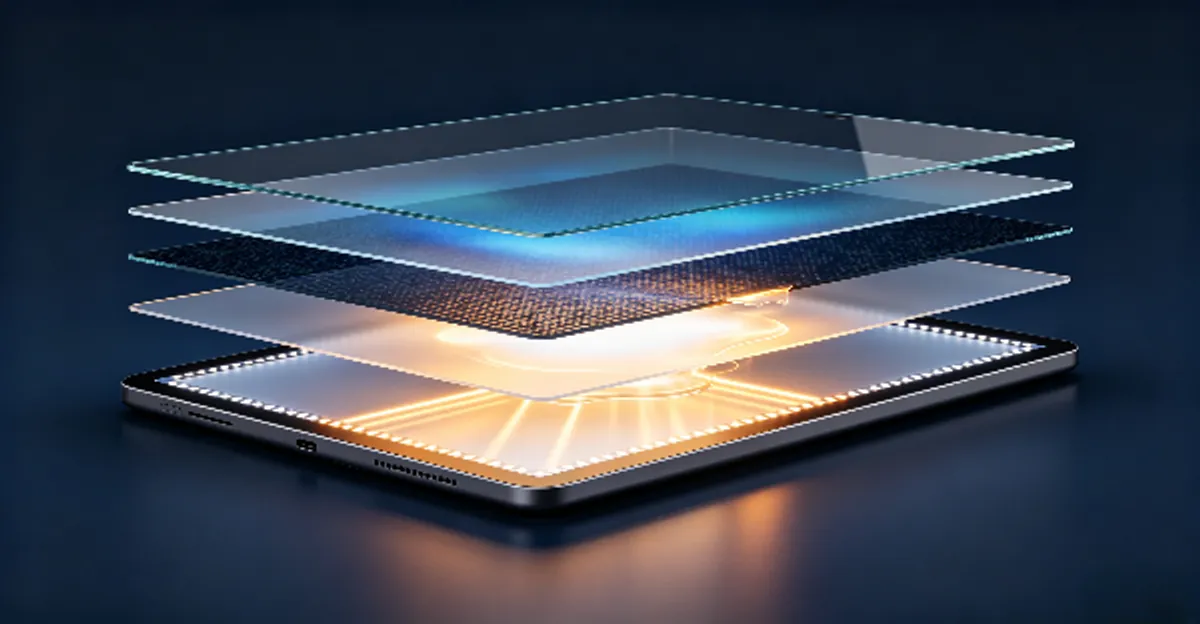
Understanding what creates a white spot starts with knowing how an iPad screen is built. Every iPad with an LCD display (all iPad Air, iPad, and iPad mini models, plus older iPad Pro versions) is a stack of thin layers:
- Protective glass: The outermost layer you touch.
- Digitizer: The touch sensor layer.
- Polarizer: A filter that controls light orientation.
- Liquid crystal panel: The layer that creates colors by twisting crystals in response to electrical signals.
- Backlight assembly: Multiple layers including a light guide plate, diffuser sheets, and reflector that together spread LED light uniformly across the entire screen.
Light from the LED edge strips travels through the light guide plate, gets scattered by the diffuser sheets, and reaches the LCD panel as evenly distributed illumination. When any layer in this assembly is damaged, separated, or compressed, light no longer distributes uniformly. It pools in the affected area, and you see a bright white patch.
This is the same mechanism behind "backlight bleeding" in LCD monitors, but concentrated into a specific spot. On iPads, the problem is especially common near the center of the screen because the logic board runs top-to-bottom through the middle of the device, concentrating heat exactly where the diffuser layers are most vulnerable.
Most Common Causes of White Spots on iPad
1. Backlight Diffuser Delamination from Heat
The single most reported cause across repair forums, Apple Support Communities, and technician threads is heat-induced backlight diffuser delamination. The iPad's logic board generates the most heat in the center of the device, and that heat rises directly toward the backlight assembly mounted directly behind the display panel.
Over months or years of use, sustained heat softens the adhesive holding the diffuser sheets in place. Tiny separations form between layers, creating air gaps. These gaps act like lenses, concentrating LED light instead of diffusing it evenly. The result is a soft, glowing white patch that typically appears in the center of the screen or just above center.
This is why so many white spot reports come from users who notice the spot developing 18-36 months after purchase — just after the one-year warranty expires. Heavy gaming sessions while charging, long video editing projects, extended Apple Pencil drawing sessions, or simply leaving the iPad in a warm environment accelerates adhesive degradation.
Manufacturers do not publish exact failure rates for this issue, but repair communities such as iFixit and Apple Support forum threads consistently identify heat delamination as the dominant cause of non-impact white spots on iPads.
2. Physical Pressure Damage
Physical pressure is the second most common cause. This typically occurs when:
- The iPad is squeezed in an overstuffed bag or backpack alongside heavy books
- A rigid or undersized case presses the display against internal components
- The iPad is closed with objects on top (especially iPad + keyboard combos)
- Heavy-handed Apple Pencil use creates concentrated pressure at drawing contact points
- The iPad is dropped onto a hard surface without cracking the glass
The pressure compresses the internal display layers, particularly the diffuser sheets and the gap between the backlight and LCD panel. This creates a "pressure mark" — a bright white cloud that may temporarily fade if pressure is released but often becomes permanent over time.
A documented case from February 2026 matched white marks on an iPad screen precisely to the owner's exact Apple Pencil drawing positions, confirming that habitual heavy-handed stylus use can leave permanent display damage.
3. Battery Swelling
An aging lithium-polymer battery can swell, pushing the rear case outward and pressing the display assembly from behind. This creates or enlarges white spots and is a serious safety concern. Unlike other causes, battery swelling requires immediate action: stop using and charging the device, do not attempt to press the battery back into place, and seek professional service right away.
Signs of battery swelling include a screen lifting from the frame, the device feeling unusually warm without heavy use, the chassis appearing slightly bent, and a rapidly growing white spot accompanied by warmth.
4. Edge Backlight Failure
Bright or dark patches appearing along the edges or corners of the screen point to edge LED failure rather than center delamination. The LED strips that illuminate the display run along the edges of the light guide plate. When these fail unevenly, light distribution becomes irregular, creating bright or dim edge patches. Apple Support Community experts treat this as a distinct defect category from center delamination.
5. Manufacturing Defects
Some white spots are factory defects that were not visible when the iPad was new. These typically appear in specific areas and may only be visible under certain conditions. Manufacturing defects are usually covered under warranty if discovered early. Apple has run one service program related to display issues — the iPad Air (3rd generation) Service Program launched in March 2020 for blank screen issues — but this program covered flickering and blanking, not white spots, and it expired long ago. There is no active Apple service program for white spots.
6. Stuck Pixels, Moisture, and Software
These three causes are worth ruling out early but account for only a small percentage of cases. A stuck pixel (one sub-pixel permanently on) looks like a pin-sharp dot, not a cloudy patch, and may respond to color-cycling videos. Moisture damage from liquid exposure can create cloudy patches that may spread over time. Software glitches after an iPadOS update occasionally produce temporary display artifacts that clear after a restart or reset.
Which iPad Models Are Most Affected
White spots are not equally distributed across iPad generations. Based on patterns from Apple Support Communities, Reddit (r/ipad), MacRumors, and repair technician reports:
| Model | Peak Reports | Typical Cause |
|---|---|---|
| iPad Pro 10.5-inch (2017) | 2017-2019 | Backlight delamination near center |
| iPad Air 3 (2019) | 2019-2021 | Widespread center spots; covered by expired Apple program |
| iPad Air 4 (2020) | 2022-2025 | Scattered delamination cases |
| iPad 10th generation (2022) | 2024-2025 | Spots with no drops or pressure reported |
| iPad Air 5 / M1 (2022) | 2024-2026 | Largest recent wave of reports |
| iPad Pro M4 series (2024+) | 2025-2026 | Isolated reports; improved adhesives reduce risk |
| iPad Mini series | All generations | Pressure spots where fingers grip the device |
No iPad generation is completely immune, but models with the M1 chip and older edge-lit LCD designs show the highest concentration of reports.
How to Diagnose a White Spot on iPad
Step 1: Screenshot Test (Rule Out Software)
Take a screenshot while the white spot is visible on screen. View the screenshot on another device or a computer. If the white spot appears in the screenshot, it belongs to the image being displayed and is a software or app issue. If the spot does not appear in the screenshot, it is a physical display defect.
This test takes under a minute and eliminates all software-based causes from further consideration.
Step 2: Solid Color Background Test
Use the Screen Test Tool to display pure backgrounds:
- Pure black: Backlight spots glow brightly against the dark background; panel spots become nearly invisible
- Pure white: Panel defects become more visible as lighter patches; backlight spots blend in
- Gray gradient: Often most revealing for subtle spots
Step 3: Brightness Response Test
Adjust the iPad brightness through its full range:
- If the white spot becomes more intense at high brightness: backlight issue (the LED light concentrating in the damaged area scales with overall brightness)
- If it stays constant regardless of brightness: panel-level physical damage to the LCD or diffuser layers
Step 4: Pressure Test
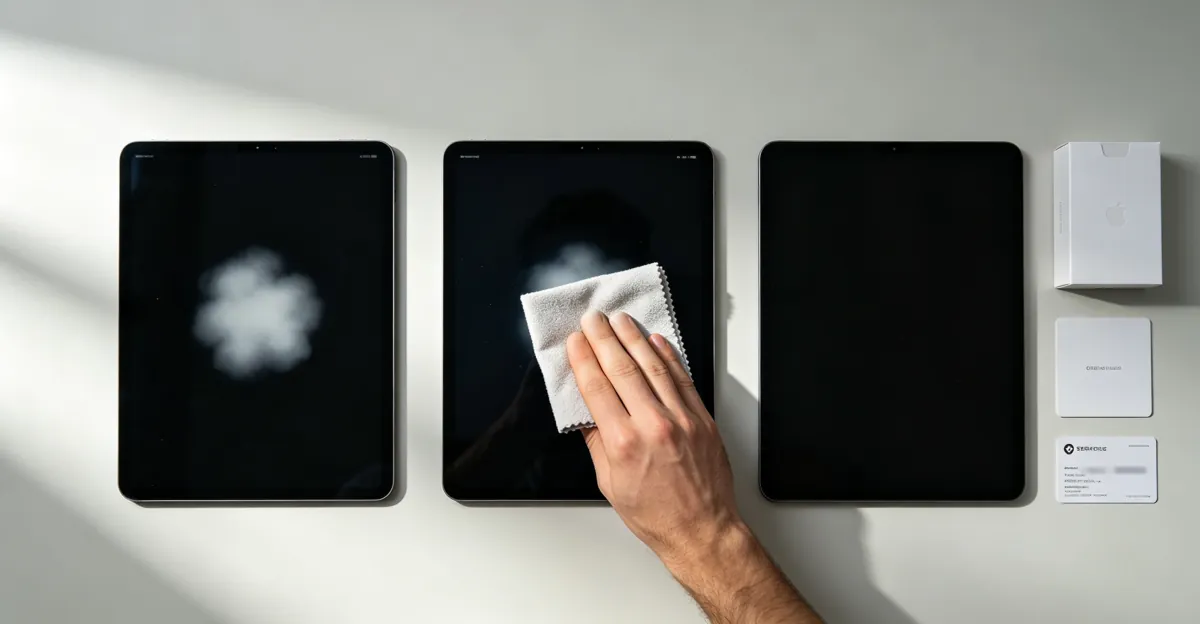
Gently press on the screen near the white spot with a soft microfiber cloth. Do not press hard.
- If the spot changes intensity when pressed: loose backlight component or pressure-induced gap (may be temporarily fixable)
- If it remains completely stable: permanent panel damage requiring professional repair
Step 5: Location Analysis
Where the spot appears provides clues about the cause:
- Center or just above center: Almost always heat delamination from the logic board below
- Edges or corners: Points to edge LED or backlight failure
- Matches your Apple Pencil grip: Pressure damage from stylus use
- Growing and accompanied by warmth: Battery swelling — stop using immediately
Step 6: Severity Scoring
Based on patterns across repair community reports, use this scoring system to decide your next step:
Assign points for each factor:
| Factor | Points |
|---|---|
| Single tiny dot | 1 |
| Several small dots | 2 |
| Large patch or cluster | 3 |
| Visible on light backgrounds only | 1 |
| Visible on all backgrounds | 3 |
| No change over weeks | 2 |
| Slowly growing over days/weeks | 4 |
| No other symptoms | 0 |
| Touch problems, flickering nearby, or warmth | 3 |
Score 1-4: Monitor and try gentle home methods
Score 5-8: Prepare for possible repair; try home methods cautiously
Score 9+: Seek professional repair soon to prevent worsening
How to Fix a White Spot on iPad
Fix 1: Rule Out Software First
Before spending any money, confirm the issue is physical:
- Restart the iPad fully (hold top button + volume button, drag power slider, wait 30 seconds, hold top button until Apple logo appears)
- Update to the latest iPadOS version
- Run a factory reset as a last resort (back up to iCloud first)
- Take a screenshot and check another device
If the spot survives all of these steps, it is physical hardware damage.
Fix 2: Temporary Home Methods for Pressure Marks
For light pressure marks only (not heat delamination), these methods have mixed but occasionally positive results:
- Pixel fixer video: Play a rapid color-cycling video on YouTube full-screen for 30-60 minutes. Only effective for true stuck pixels, not cloudy patches. Success rate is low for pressure marks.
- Gentle pressure release: Place a soft microfiber cloth over the spot and apply very light circular pressure for 10-20 seconds. Some users report temporary fading; the spot typically returns within days.
- Cool-down period: Leave the iPad powered off in a cool, dry room overnight. Heat-related spots occasionally shrink noticeably. This works best in the early stages of delamination.
- Suction cup method: A small suction cup applied to the spot for several minutes has worked for some users, but carries risk of cracking the glass if applied with too much force.
Important: Stop immediately if the spot spreads or the glass flexes. None of these methods fix heat delamination permanently.
Fix 3: Check AppleCare+ or Warranty Status
Before paying anything:
- Go to Settings > General > About > Coverage to check active coverage
- If AppleCare+ is active, contact Apple Support — screen replacement costs $29-$49
- If under standard one-year warranty with no visible physical damage, explain normal usage and request a free inspection
- Prepare photos of the spot taken over time to demonstrate careful handling
At the Genius Bar or authorized service provider, calmly explain your normal usage pattern. Community reports indicate that polite escalation to a manager, combined with photo evidence of careful handling, has secured goodwill repairs for some users whose claims were initially denied.
Fix 4: Professional Repair Assessment
Visit an Apple Store or Apple Authorized Service Provider for:
- Free diagnostic testing
- Accurate cause identification
- Official repair options with genuine parts
- Warranty preservation when applicable
Apple's official repair process for iPads is unit exchange rather than backlight-level repair. Apple replaces the display assembly or the entire iPad depending on model and availability. This removes the spot entirely but does not address the underlying heat source, so preventive care remains important after repair.
Fix 5: Third-Party Repair
For out-of-warranty repairs when Apple pricing is prohibitive:
- Research repair shops with verified reviews and transparent pricing
- Ensure they use quality replacement screens from reputable suppliers
- Compare prices between at least three providers
- Understand that third-party repairs may void any remaining implied warranty and that trade-in values for affected iPads are significantly reduced even when the screen still works
Repair costs at third-party shops typically range from $200-$450 in the US, depending on iPad model and screen quality.
Repair Cost Reference by Model and Route
| Repair Route | iPad Air / Standard | iPad Pro | iPad Mini |
|---|---|---|---|
| AppleCare+ screen damage | $29-$49 | $29-$49 | $29-$49 |
| Apple out-of-warranty exchange | $300-$419 | $499-$699 | $199-$299 |
| Authorized third-party | $200-$350 | $300-$500 | $150-$250 |
| Independent local repair | $150-$300 | $250-$450 | $100-$200 |
| Europe (EUR), Apple | EUR 200-350 | EUR 350-550 | EUR 150-250 |
| Europe (EUR), third-party | EUR 95-250 | EUR 200-380 | EUR 80-150 |
Prices reflect 2026 estimates from Apple service pages and community-verified reports. Actual quotes vary by region, model, and availability.
Will the White Spot Spread?
Most documented white spots spread or worsen over time, though the rate varies significantly. Repair community follow-up reports include cases where a small spot grew ten times larger within three days, and cases where new spots appeared weekly over a month. A minority of spots remain stable for months or even years without change.
Monitor your spot by photographing it against a plain white background once a month under the same lighting conditions. If the spot grows between photos, accelerate your repair decision. If the spot spreads rapidly while the device feels warm or the chassis appears warped, stop using the iPad immediately and have the battery checked — this combination suggests battery swelling, a safety hazard.
Is It Safe to Keep Using My iPad?
In most cases, yes. Touch functionality and Apple Pencil input continue to work normally even with a white spot, and the issue remains purely cosmetic until the spot grows large enough to interfere with your primary viewing area.
The single exception: any combination of a growing spot, device warmth, screen lifting from the frame, or chassis warping indicates battery swelling. In this situation, stop using and charging the device, do not attempt to force the screen back into place, and seek professional service right away. A swollen lithium-polymer battery presents a fire risk if punctured or damaged accidentally.
Prevention Tips for iPad Screens
White spots from heat delamination and pressure damage are largely preventable with informed handling:
- Manage heat during intensive tasks: Gaming while charging, long video editing sessions, and extended Apple Pencil drawing generate significant heat. Allow the iPad to cool between intensive sessions rather than running it continuously at high load.
- Use a case with a rigid back panel: A padded folio or smart case with a hard back spreads external pressure across the device surface rather than concentrating it in one spot. Avoid thin "fashion" cases that offer minimal protection.
- Never place heavy objects on the iPad: This includes books, laptops, and bags stuffed to capacity. Store the iPad flat, face-up, in a dedicated compartment.
- Rest your hand lightly when using Apple Pencil: Heavy palm pressure during long drawing sessions concentrates force exactly where the diffuser layers are most vulnerable. Adjust your grip and take breaks.
- Keep the iPad away from heat sources: Direct sunlight, parked cars, and radiators accelerate the adhesive degradation inside the display. Even brief exposure to extreme heat can initiate delamination.
- Avoid overtight cases: A case that fits too snugly, especially after adding a screen protector, can create constant pressure across the frame that migrates inward over time.
- Inspect monthly: Display a full white background in bright light once a month and examine the screen carefully for early spots. Catching delamination early, before it spreads, improves your options at the repair desk.
LCD vs OLED: Why the White Dot Issue Differs on Newer iPads
All iPad models before 2024 use LCD displays with edge-lit backlights. On these devices, white spots are almost always backlight-related. The newer iPad Pro (M4, 2024+) uses an OLED display, which has no backlight — each pixel generates its own light. On OLED iPads, a persistent bright dot is far more likely to be a dead or stuck pixel (a hardware failure of an individual sub-pixel) rather than backlight delamination.
Stuck pixels on OLED can sometimes be recovered with the same color-cycling videos used for LCD, but dead pixels are permanent and require full panel replacement. The treatment is the same (professional repair), but the underlying mechanism is different. If you have a newer iPad Pro with an OLED screen, the diagnostic steps and repair options differ from the LCD-specific guidance in this article.
Related Guides
- White Spot on Laptop Screen: Related laptop pressure spot guide
- White Spots on Mobile Screen: General mobile white spot guide
- Black Spots on Screen: Related display spot guide
- Screen Test Tool: Free diagnostic tool for screen issues
Conclusion
A white spot on an iPad screen is almost always a physical hardware defect caused by heat delamination of the backlight diffuser, physical pressure damage, or (rarely) a stuck pixel. No software update, restart, or settings adjustment removes a true white spot. The diagnostic process — starting with the screenshot test and ending with a severity score — determines whether you can manage the spot temporarily at home or need to arrange professional repair.
Always check AppleCare+ or warranty status before paying for any repair. With active coverage, Apple can replace the display assembly or the entire device, usually at no cost or a minimal fee. Without coverage, compare the repair cost against your iPad's current trade-in value — for older models, replacement may make more financial sense than a new screen that could develop the same problem.
Prevention is the most effective strategy: manage heat during heavy use, use a padded case, avoid pressure on the display, and inspect your screen monthly. The investment in a quality case and careful handling is a fraction of the cost of screen replacement. Use our screen test tool to document your white spot for repair consultations.